

Skip to main contentSkip to footer

I2C 4–20 mA Current Loop Transmitter Module (3-Wire) – IS4413-M1

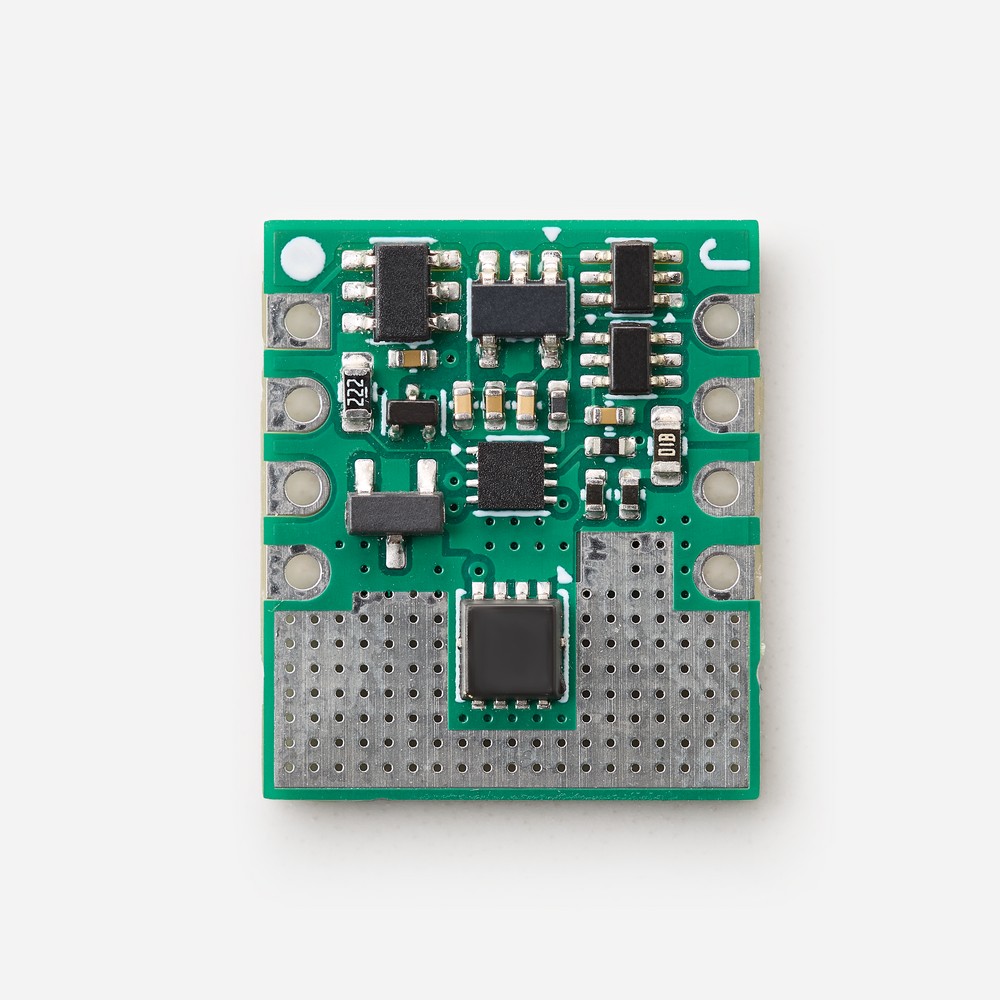
I2C current loop transmitter module (3-wire). Generate a 4-20mA signal from your microcontroller with a single I2C write, without designing any analog circuitry.

Current Loop Output:
– Output current: 0 mA to 22 mA
– Resolution: 12-bit
– Loop load: 250 Ω
– Configurable safe power-up current

I2C Interface:
– Slave address: 96 (7-bit)
– Speeds: 100 kbps, 400 kbps, 3.4 Mbps
– Voltage: 5 V
– No libraries required

Module:
– Power supply: 24 V (module and current loop)
– Size: 15.24 × 17.78 mm, breadboard compatible

In stock

Volume pricing

Qty. Price
1 - 10 3,00 €
11 - 50 2,70 €
51 + 2,25 €
SKU: IS4413-M1

I2C Current Loop Transmitter for Your Microcontroller

Download the example from github: https://github.com/inacks/ISXMPL4413ex1

The IS4413-M1 is an I2C current loop transmitter module (3-wire configuration) that generates a 4-20mA current loop signal controlled by your microcontroller. Your firmware sets the output current with a single I2C write, and the module generates it on the COUT pad. As a result, you can add a 4-20mA output to your product without designing any analog circuitry.

The module saves all the time needed to engineer and validate the analog side of a current loop transmitter, so you can finish your product sooner. In addition, it uses the standard I2C interface found in almost any microcontroller. Therefore, you do not need any dedicated library, and your firmware stays easy to maintain and port.

Applications

  • Sensors and transmitters: send pressure, temperature, flow, level, pH, conductivity, position, vibration, gas concentration or weight readings to a PLC.
  • Process control systems: add 4-20mA analog outputs to your own controllers and PLCs.
  • Actuator controllers: drive current loop actuators directly from your microcontroller, without a PLC.
  • Custom designs: build application-specific current loop solutions on a ready-to-use module.

How the I2C Current Loop Transmitter Works

Your microcontroller (I2C master) controls this I2C current loop transmitter with a single four-byte write. It sends the slave address (96), a command byte and the two data bytes of a 12-bit value. The module then generates the corresponding loop current on COUT. A value of 0 generates 0 mA, while 4095 generates approximately 22 mA.

  • Command 64 – Set Current Value: updates the output current. This is the normal operation.
  • Command 96 – Set Default Value: updates the output current and also stores it in the internal EEPROM as the safe power-up current.

For example, the value 725 generates approximately 4 mA, and 3640 generates approximately 20 mA. See the Examples tab for a complete Arduino sketch.

Configurable Safe Power-Up Current

At power-up, the module generates a stored safe current until your microcontroller sends its first command. This prevents an unintended output during the few milliseconds your firmware needs to start. For example, set the power-up current to 0 mA. The current loop receiver then discards the signal as invalid data until your firmware takes control.

3-Wire Configuration: More Than 4 mA for Your Device

A 2-wire transmitter takes its own power from the current loop, so it cannot consume more than 4 mA without corrupting the 4-20mA reading. In contrast, a 3-wire current loop transmitter uses separate circuits for its power supply and for the loop current. Consequently, your device can consume more than 4 mA, which allows much more complex self-powered sensors and transmitters.

Extended Current Range: 0 to 22 mA

Besides the standard 4-20mA range, this I2C current loop transmitter also covers 0 to 4 mA and 20 to 22 mA. While 4 mA to 20 mA represents 0% to 100% of the measured magnitude, the extended margins carry extra information and keep the loop alive. For example, they can signal saturation (3.6 mA to 4 mA, or 20 mA to 20.4 mA) and fault conditions (below 3.3 mA or above 20.7 mA).

Key Features

  • Output current: 0 mA to approximately 22 mA, with 12-bit resolution (values 0 to 4095).
  • Current loop: 3-wire configuration, 24 V supply, 250 Ω loop load.
  • I2C interface: 5 V, fixed slave address 96 (7-bit), 100 kbps, 400 kbps and 3.4 Mbps.
  • Single power supply: 24 V for the module and the current loop.
  • Configurable safe power-up current, stored in the internal EEPROM.
  • Ready to use: no calibration needed for general use.
  • Compact module: 15.24 × 17.78 mm, compatible with 2.54 mm breadboards and protoboards.

Quick Start with the I2C Current Loop Transmitter

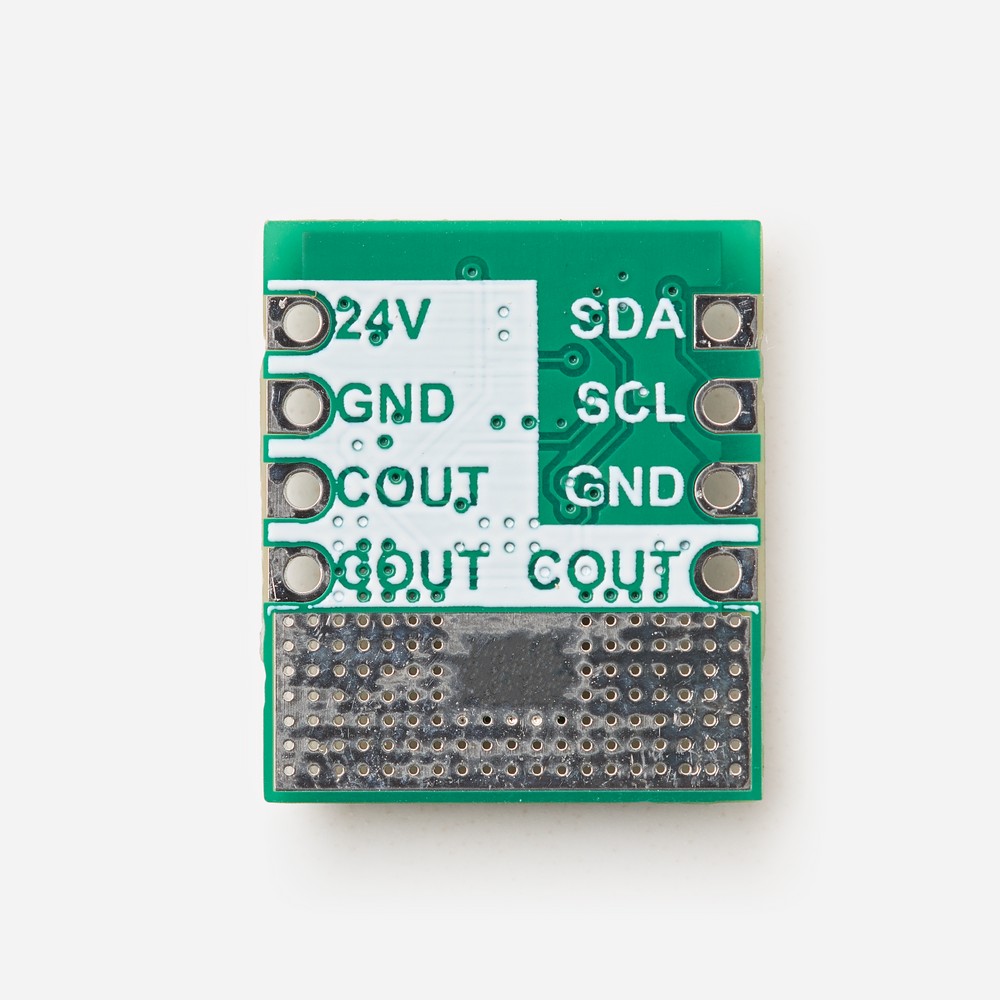
  1. Connect a 24 V power supply (at least 30 mA) to the 24V and GND pads.
  2. Connect COUT to the input of your current loop receiver, for example a PLC analog input or a 250 Ω resistor. Then connect the receiver return to GND.
  3. Connect SDA and SCL to your microcontroller, with pull-up resistors to 5 V: 4.7 kΩ at 100 kbps, or 2 kΩ at 400 kbps and 3.4 Mbps. Your microcontroller must share the same GND.
  4. Finally, write the bytes 64, 45 and 80 to address 96. This Set Current Value command sends the value 725, so the output current changes to approximately 4 mA.

Do you want to try it from your PC first? The Kappa4413USB is an isolated USB 4-20mA transmitter based on the IS4413-M1, controlled with simple text commands. To read 4-20mA signals instead, see the IS4420-M1 I2C current loop receiver module.

For the electrical characteristics, the pad description and a hardware example, see the IS4413-M1 datasheet (ISDOC150).

This company and the products provided herein are developed independently and are not affiliated with, endorsed by, or associated with any official protocol or standardization entity. All trademarks, names, and references to specific protocols remain the property of their respective owners.

(This product includes the IS4413-M1 module. The 24 V power supply, the microcontroller and the current loop receiver are not included.)

Q: What is the IS4413-M1 used for?

A: To generate a 4-20mA current loop signal from a microcontroller. Use it to build sensors and transmitters that send process data to a PLC (pressure, temperature, flow, level, pH and more), to control current loop actuators, or to add 4-20mA analog outputs to your own controllers.

Q: Do I need to design any analog circuitry or install any libraries?

A: No. The module contains the complete analog circuitry of the current loop transmitter, and it uses the standard I2C interface. Any I2C driver can control it, for example the Arduino Wire library or the STM32 HAL.

Q: How do I set the output current?

A: Write four bytes to the module: the I2C slave address 96 (7-bit, write), the command 64 (Set Current Value), Data (Hi) with bits D11–D4 of the 12-bit value, and Data (Lo) with bits D3–D0 in its upper four bits (the lower four bits are 0). For example, to set the value 725 (approximately 4 mA), send 64, 45 and 80 after the address byte. See the Examples tab for a complete Arduino sketch.

Q: What output current range and resolution does it support?

A: From 0 mA to approximately 22 mA, with 12-bit resolution (values 0 to 4095). Besides the standard 4-20mA range, you can generate currents below 4 mA and above 20 mA to signal saturation and fault conditions. Approximate values: 4 mA = 725 and 20 mA = 3640. The value 0 generates 0 mA, and 4095 generates the maximum current, approximately 22 mA.

Q: How accurate is the output current?

A: The module is ready to use, and no calibration is needed for general use. Unit-to-unit variation is minimal, but the values above are approximate: the exact current depends slightly on each unit and on the temperature. For maximum accuracy, calibrate each module individually. For example, measure the output current at two values (near 4 mA and near 20 mA) and calculate your values from these measurements. Keeping the module temperature stable also improves accuracy.

Q: What is the safe power-up current?

A: The current that the module generates at power-up, before your microcontroller sends any I2C command. To change it, use the Set Default Value command (command 96 instead of 64), and then wait at least 50 ms for the EEPROM write to finish. Setting it to 0 mA prevents the receiver from interpreting the output as a valid measurement before your firmware takes control. As the value is stored in EEPROM, use command 96 only to change the power-up current, not to update the output continuously.

Q: What is the advantage of a 3-wire current loop transmitter?

A: A 2-wire transmitter takes its own power from the current loop, so it must consume less than 4 mA. A 3-wire transmitter uses separate circuits for its power supply and for the loop current. As a result, your device can consume more than 4 mA without affecting the 4-20mA reading, which allows much more complex self-powered sensors and transmitters.

Q: How do I connect the module?

A: Connect the 24 V power supply to the 24V pad (pad 8) and to the GND pads (pads 3 and 7). Then connect COUT (pads 4, 5 and 6) to the input of your current loop receiver, typically a PLC analog input or a 250 Ω resistor, and connect the receiver return to GND. Finally, connect SDA (pad 1) and SCL (pad 2) to your microcontroller. The module, your microcontroller and the receiver share the same GND. On your PCB, connect both GND pads and all three COUT pads to improve the return paths and the thermal dissipation.

Q: What power supply do I need?

A: A 24 V power supply that can provide at least 30 mA. It powers both the module and the current loop.

Q: Which microcontrollers are compatible?

A: Any microcontroller, microprocessor or single-board computer with an I2C master interface, such as Arduino, STM32 or ESP32. The I2C interface works at 5 V, so pull SCL and SDA up to 5 V: 4.7 kΩ at 100 kbps, or 2 kΩ at 400 kbps and 3.4 Mbps. With a 3.3 V microcontroller, use an I2C level shifter unless its I2C pins are 5 V tolerant.

Q: Can I connect several IS4413-M1 modules to the same I2C bus?

A: Not directly, because the I2C slave address is fixed (96). To control several modules, connect each one to a separate I2C bus or use an I2C multiplexer.

Q: Can I evaluate the IS4413-M1 from my PC?

A: Yes. The Kappa4413USB is an isolated USB 4-20mA transmitter based on the IS4413-M1. It generates the loop current from simple text commands, sent from a serial terminal or from your own scripts, without writing any firmware.

Q: What is included?

A: The IS4413-M1 module. The 24 V power supply, the microcontroller and the current loop receiver are not included.

Arduino Example

This sketch controls the IS4413-M1 from an Arduino with the standard Wire library. The Wire library comes with the Arduino IDE, so you do not need to install any additional library. The sketch defines a few small functions that you can reuse in your own projects:

  • is4413Write() sends the four-byte write: slave address, command, Data (Hi) and Data (Lo). It returns false if the IS4413-M1 does not acknowledge the transfer.
  • is4413SetValue() and is4413SetDefault() implement the Set Current Value (64) and Set Default Value (96) commands.
  • is4413SetMilliamps() converts a current in mA into a value, using the two points VALUE_AT_4MA and VALUE_AT_20MA. Replace them with your own measurements for better accuracy.

The sketch generates 4, 8, 12, 16 and 20 mA, two seconds each, and reports every step on the Serial Monitor at 115200 baud.

Wiring (Arduino Uno)

  • Arduino SDA (A4) to IS4413-M1 SDA (pad 1), and Arduino SCL (A5) to IS4413-M1 SCL (pad 2). On other boards, use the board’s SDA and SCL pins, for example pins 20 and 21 on the Arduino Mega 2560.
  • 4.7 kΩ pull-up resistors from SDA and SCL to the Arduino 5V pin.
  • 24 V power supply to the 24V pad (pad 8) and to the GND pads (pads 3 and 7). Connect the Arduino GND to the same GND.
  • COUT (pads 4, 5 and 6) to your current loop receiver. To test without a PLC, connect a 250 Ω resistor (0.25 W or higher) between COUT and GND, and measure the voltage across it: approximately 1 V at 4 mA and 5 V at 20 mA.

Sketch

// -----------------------------------------------------------------------------
// IS4413-M1 - Arduino example
// Generates 4, 8, 12, 16 and 20 mA on the current loop output, two seconds
// each, and reports every step on the Serial Monitor (115200 baud).
// Board: Arduino Uno or any Arduino with 5 V I2C. With 3.3 V boards, use an
// I2C level shifter.
// -----------------------------------------------------------------------------
#include <Wire.h>

const uint8_t IS4413_ADDRESS  = 96;   // I2C slave address (7-bit)
const uint8_t CMD_SET_CURRENT = 64;   // Set Current Value: updates the output
const uint8_t CMD_SET_DEFAULT = 96;   // Set Default Value: output + EEPROM

// Approximate conversion from mA to output value (0..4095).
// For the best accuracy, calibrate your module and replace these two points.
const float VALUE_AT_4MA  = 725.0;
const float VALUE_AT_20MA = 3640.0;

// Sends a command and a 12-bit value (0..4095) to the IS4413-M1.
// Returns true if the IS4413-M1 acknowledged the transfer.
bool is4413Write(uint8_t command, uint16_t value) {
  value &= 0x0FFF;                               // Keep the 12 useful bits
  Wire.beginTransmission(IS4413_ADDRESS);
  Wire.write(command);
  Wire.write((uint8_t)(value >> 4));             // Data (Hi): D11..D4
  Wire.write((uint8_t)((value & 0x0F) << 4));    // Data (Lo): D3..D0, then 0000
  return Wire.endTransmission() == 0;            // 0 means success
}

// Set Current Value: updates the output current (normal operation).
bool is4413SetValue(uint16_t value) {
  return is4413Write(CMD_SET_CURRENT, value);
}

// Set Default Value: updates the output current and stores it in the EEPROM
// as the safe power-up current. The EEPROM write needs up to 50 ms.
bool is4413SetDefault(uint16_t value) {
  bool ok = is4413Write(CMD_SET_DEFAULT, value);
  delay(50);
  return ok;
}

// Converts a current in mA into an output value and sends it.
bool is4413SetMilliamps(float mA) {
  float value = VALUE_AT_4MA + (mA - 4.0) * (VALUE_AT_20MA - VALUE_AT_4MA) / 16.0;
  value = constrain(value, 0.0, 4095.0);
  return is4413SetValue((uint16_t)(value + 0.5));  // Round to the nearest value
}

void setup() {
  Serial.begin(115200);
  Wire.begin();                 // I2C master, 100 kbps (Standard Mode)
  Serial.println("IS4413-M1 Arduino example");

  // Optional, only needed once: store 0 mA as the safe power-up current.
  // is4413SetDefault(0);
}

void loop() {
  const float steps[] = {4.0, 8.0, 12.0, 16.0, 20.0};

  for (uint8_t i = 0; i < 5; i++) {
    if (is4413SetMilliamps(steps[i])) {
      Serial.print("Output set to ");
      Serial.print(steps[i], 0);
      Serial.println(" mA");
    } else {
      Serial.println("Error: no answer from the IS4413-M1, check the wiring and the 24 V supply");
    }
    delay(2000);
  }
}

Serial Monitor output:

IS4413-M1 Arduino example
Output set to 4 mA
Output set to 8 mA
Output set to 12 mA
Output set to 16 mA
Output set to 20 mA
Output set to 4 mA
...

If the IS4413-M1 does not acknowledge the transfer, the sketch prints an error message instead. In this case, check the I2C wiring, the pull-up resistors and the 24 V power supply.

The same four-byte write works on any microcontroller. For the complete I2C description, see the IS4413-M1 datasheet (ISDOC150).

Evaluation boards, Modules & other related products

Evaluation boards, modules, and accessories designed for fast prototyping and easy integration. Featuring standard interfaces and built-in transceivers, they simplify testing and development across platforms like Arduino, Nucleo, or Raspberry Pi. Ideal for adding RS485, RS232, or Ethernet functionality with minimal effort and maximum compatibility.

No results found.

Have a question?

Fill out this field
Please enter a valid email address.
Fill out this field
You need to agree with the terms to proceed